January 22, 2021
Depop vs Poshmark: Battle of the Best Reselling Apps
Compares the pros and cons of using the Poshmark and Depop clothing selling marketplaces
Depop and Poshmark are two of the most popular online shopping platforms today. And if you are thinking of starting an online selling business, then I suggest that you check both of these apps to see which one is the best for you.
To help you decide on which platform to use, I will be comparing Depop and Poshmark based on the things that I believe have a direct impact on your target outcome - which are, of course, sales and revenue.
Let’s start, shall we?
Listing an Item
Both Depop and Poshmark can be accessed using any browser and they also have apps that can be downloaded via Google Play (Android OS) and Apple App Store (Apple IOS). Both Websites and apps are very intuitive and very easy to use.
Listing an item is very easy and pretty straightforward for both websites/apps. However, they do have some differences when it comes to listing functionalities that you may want to know and I’m going to itemize them for you.
Uploading Pictures
One of the main differences with their listing functionalities is the number of photos that you can upload. With Depop, you are allowed to upload 4 pictures of the item that you are selling and one video. With Poshmark, you can upload as many as 16 pictures, unfortunately, video is not allowed with Poshmark.
Why do you need to know this as an online seller?
Pictures help online customers decide if they’re going to buy an item or not. They don’t have any way of seeing the actual item in person. And the more pictures you post, the easier for your customers to decide if they’re going to buy your item or not.
This is also very important if you are selling designer goods. Depop doesn’t allow photo collage and it’s almost close to impossible to show all the details of a designer bag in just four pictures.
Sharing Your Posts
Poshmark made sharing your post to social media websites a bit easier than Depop. As soon as you finish your listing, you have an option to share it right away to the major social media websites such as Facebook, Twitter, Instagram, and Tumblr.
And you can also share your listing to Posh Party, which I will discuss later.
With Depop, you can copy the link using the copy button and paste it on your social media accounts.
Ease of Use for Buyers
Depop is more like a shoppable Instagram feed. As a buyer, you have to use keywords to search for an item. This is one reason why Depop encourages sellers to add relevant keywords to their listings. As a seller, you are allowed to put in five hashtags per post.
With Poshmark, you can search using keywords and you can also find items using categories. As a buyer, I get more options with Poshmark and sellers also benefit from this functionality because it increases the chances of being found by potential buyers.

Community and Market Presence
According to Depop’s website, they have around 21 Million community members, while Poshmark has around 60 Million members in the US and Canada.
Take this information with a grain of salt since the size of membership does not always directly translate to sales for a specific store. However, this is still good to know because it simply means, the bigger the community, the higher the chances of selling your item real fast.
Please take note as well that even if Depop’s membership as of now is smaller compared to Poshmark, Depop is available to more countries.
Both platforms have huge Gen Z members which is also another thing that you have in mind if you want to be successful in selling on either Depop or Poshmark.
Communicating with Prospective Customers
Poshmark has an ‘Offer’ button that potential buyers can use to make offers to your items. Please note that Poshmark offers are binding so be careful in accepting offers.
Poshmark also gives the seller an option to send ‘Offer to Likers’. When people ‘Like’ your item on Poshmark, you can easily assume that they’re interested in your item and this gives you an opportunity to close the sale.
Direct messaging is one of the things that I like about Depop. You can negotiate privately with your customers. I do hope that Poshmark adds this feature soon because a lot of other online selling apps have this functionality.

Marketing Support
Depop
- Depop is active in both Instagram and Email marketing and they often post pictures of items together with the Instagram account of their sellers.
- Depop has an ‘Explore’ page which is basically a section that features curated items by the Depop Editorial Team.
- To increase the chances of getting seen by Depop users, you can ‘Bump’ or you can move your listings on top of the feed by editing your listing and saving it again.
Poshmark
- Poshmark has an interactive online event called Posh Party. It’s a real-time virtual shopping event where users can meet up in the Poshmark app to shop, share, and sell items.
- Just like Depop, Poshmark also promotes its sellers on Instagram.
- You can move your listing on top of your followers’ feed by ‘Sharing’ your listing.

Receiving Payment
When it comes to receiving payment, Depop is the fastest. Once you make a sale, the payment of the buyer is sent right away to the PayPal account that is linked to your Depop.
With Poshmark, it’s an entirely different story. Poshmark will only release the payment to the seller after the buyer receives the item. They usually release the money to the seller’s Poshmark account within 3 days of delivery.
Fees on Depop vs Poshmark
It’s free to list your items on both websites/apps but they do have different commission fee structures.
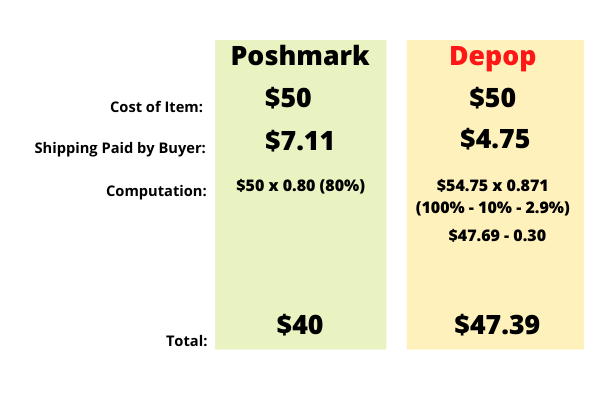
With Poshmark, once you sell an item, a small fee will be deducted from the final order price. For sales under $15, the fee is a flat rate of $2.95. For sales above $15, the fee is 20% and you keep 80%.
With Depop, you will be charged a 10% commission fee plus the PayPal processing fee of 2.9% + $0.30 payment processing fee when an item sells.
Shipping Fees on Depop vs Poshmark
Poshmark has a flat rate of $7.11 for expedited shipping on all orders. The shipping fee is paid for by the buyer.
With Depop, you could arrange your own shipping or you can Ship with Depop with USPS (which is only available to Mainland US only).
Returns and Refunds
Both Depop and Poshmark have their own Return and Refund Policy. With Depop, as long as the transaction happened within the app and the buyer clicked on the ‘Buy’ button, both parties are protected. All sales are final on Poshmark, but refunds can be requested if items are ‘significantly not as described’.

Selling Internationally
Poshmark sellers do not have an option to sell internationally at the moment. Depop sellers can sell to international markets but you have to arrange your own shipping by yourself.
Which is better - Depop or Poshmark?
Each website/app has its own advantages and disadvantages and it will all boil down to your target market and the kind of items that you want to sell.
If you’re going to ask me, the best option is, to cross-post your items to both Depop and Poshmark. Listing is free anyway to both of these apps and you only get charged once you make a sale.